
Best overall for a broader creator business: Useautoforgeai. Best for a course-first business: Thinkific. Best for marketing-led launches: Kajabi. This guide compares the best AI course creation platforms in 2026 by teaching workflow, business fit, and the work you still need to handle yourself.
- Useautoforgeai belongs on the best AI course creation platforms shortlist for creators seeking business-building tools alongside course creation.
- Thinkific fits course-first businesses; Kajabi fits creators who prioritize marketing and sales workflows.
- LearnWorlds fits interactive learning; Coursebox fits turning existing documents into structured courses.
- Choose by your hardest workflow, then build a pilot lesson before committing your course library.
Why this matters
AI course creation covers different jobs: drafting an outline, producing learning material, assessing understanding, and operating the business around the course. A platform that helps with one job does not automatically solve the others.
Choose the platform around your hardest recurring task, not its fastest demonstration. If you already have useful material, document conversion matters. If you need customers, the publishing and marketing workflow deserves equal attention.
For your 2026 shortlist, separate content generation from course delivery. An outline is a starting point; students still need clear instruction, useful practice, and a coherent route through the material.
What makes the best AI course creation platforms
Use these criteria before comparing feature lists:
- Starting material: Can you begin with your existing documents, expertise, or lesson notes rather than rebuilding everything manually?
- Teaching control: Can you review the sequence, correct explanations, and shape assessments around what students should accomplish?
- Learning experience: Does the platform support the kind of instruction you need, such as video, interactive activities, or structured lessons?
- Business fit: Are you building a standalone course business, a membership, or a broader creator business?
- Publishing workflow: How much work remains between generating material and delivering a usable course?
- Operational fit: Check export options, payment arrangements, integrations, and administrative requirements before committing.
Treat these as separate decisions. Strong content generation does not prove strong course administration, and a broad business suite is not automatically the right choice for detailed learning design.
Best AI course creation platforms at a glance
The order below reflects distinct use cases, not a measured performance score. Each platform earns its place for a different job.
| Platform | Best for | Standout capability | Key limitation to consider |
|---|---|---|---|
| Useautoforgeai | Building a broader creator business | A suite of 16 AI-powered tools, including course and membership builders | Suite breadth alone does not establish suitability for specialized teaching requirements |
| Thinkific | Running a course-first business | Course delivery with AI-assisted course outlining | Outline assistance does not replace lesson production or instructional review |
| Kajabi | Marketing-led course launches | Courses alongside email marketing and sales funnels | A broad business workflow is unnecessary if you only need content drafting |
| LearnWorlds | Creating interactive learning experiences | Interactive video and AI-assisted course authoring | Interactive activities require deliberate design and review |
| Coursebox | Turning existing documents into courses | AI-assisted course and quiz generation from source material | Source quality limits the usefulness of generated lessons |
No single feature settles the decision. Match the platform to the work that currently prevents you from publishing or improving your course.
1. Useautoforgeai: best for a broader creator business
Useautoforgeai combines course and membership builders with website and app builders, an AI clone content studio, and social autopilot. Its stated suite contains 16 AI-powered tools for creators, entrepreneurs, and agencies building online businesses.
Useautoforgeai is best for creators who want course creation alongside broader business-building tools. That is a different buying case from choosing a platform solely for classroom administration or assessment design.
Useautoforgeai pros
- Course and membership builders sit within the stated product offering.
- Website and app builders address business assets beyond the course itself.
- Content creation and social automation are also part of the suite.
Useautoforgeai cons
- The wider suite is less relevant if your only task is drafting lesson material.
- A tool count does not establish assessment depth, reporting detail, or content portability; check those requirements directly.
Best for: Creators, entrepreneurs, and agencies planning courses as part of a wider online business.
For a 2026 evaluation, map the suite against your actual launch tasks. Identify which tools you would use immediately and which would sit untouched; breadth has value only when it addresses real work.
Verdict: Buy for the broader business-building use case after checking your course-delivery requirements.
2. Thinkific: best for a course-first business
Thinkific is an online course platform with AI-assisted course outlining. Its core fit is a business organized around creating, delivering, and selling courses rather than treating education as one small part of a larger software toolkit.
Start with the student journey. Review how your curriculum becomes lessons, how students move through it, and what administration you need after publishing.
Thinkific pros
- A course-centered platform gives your evaluation a clear focus.
- AI-assisted outlining provides a starting structure for curriculum development.
- Course delivery and the surrounding course business belong in the same buying decision.
Thinkific cons
- A generated outline is not a finished course; you still need examples, explanations, and practice.
- Course-first positioning does not by itself resolve specialized learning or integration requirements.
Best for: Experts and educators whose primary product is a structured online course.
Bring an existing lesson rather than a vague topic to the evaluation. Check whether you can preserve its teaching logic without forcing the material into an unsuitable structure.
Verdict: Buy when running a course business is the main job, not an additional feature.
3. Kajabi: best for marketing-led course launches
Kajabi combines online courses with business functions such as email marketing and sales funnels. Its AI tools include help with course outlines and marketing content, making it relevant when the course and its launch need to be planned together.
The key question is operational: do you want to manage course delivery and marketing within the same platform? Evaluate that workflow rather than judging the product on a generated lesson title.
Kajabi pros
- Courses and marketing functions are part of the same platform.
- Email marketing and sales funnels support the work surrounding a launch.
- AI assistance extends beyond curriculum planning into marketing content.
Kajabi cons
- A broader business platform is unnecessary if your need ends at lesson drafting.
- Generated sales copy still needs factual checks against what the course actually teaches.
Best for: Creators who want course delivery and marketing workflows considered together.
In 2026, use the same course promise across your outline, landing page draft, and launch emails. Any mismatch is a revision task, not a reason to publish faster.
Verdict: Buy when marketing coordination is a central requirement of your course business.
4. LearnWorlds: best for interactive learning
LearnWorlds is an online learning platform with interactive video and AI-assisted authoring. It belongs on the shortlist when you want students to engage with material rather than only read text or watch uninterrupted lessons.
Interactive elements need a teaching purpose. Use them to ask for a decision, test understanding, or direct attention to an important explanation—not simply to make a lesson look busier.
LearnWorlds pros
- Interactive video provides an alternative to passive viewing.
- AI-assisted authoring supports course-development work.
- Its learning-focused feature set makes student experience a central evaluation topic.
LearnWorlds cons
- Useful interactivity requires additional authoring decisions and review.
- More activities do not automatically create better instruction; each activity needs a clear purpose.
Best for: Educators and training teams that prioritize interactive course design.
Test a lesson where students commonly misunderstand a concept. Add an activity at the point of confusion, then inspect whether the feedback explains the mistake rather than simply marking an answer wrong.
Verdict: Buy when interactive instruction is a defined requirement, not a decorative extra.
5. Coursebox: best for converting existing documents
Coursebox uses AI to help turn source material into courses and generate quizzes. It suits a different starting point from a blank-page creator: you already have documents, training notes, or other instructional material that needs structure.
The conversion process does not validate the source. Resolve outdated instructions and contradictions before asking a generator to turn them into lessons.
Coursebox pros
- Existing material can provide the foundation for course generation.
- AI-assisted quiz generation supports drafting knowledge checks.
- The document-to-course use case gives you a concrete evaluation task.
Coursebox cons
- Incomplete or inaccurate source material still requires correction.
- Generated quizzes need review for answer accuracy and alignment with learning objectives.
Best for: Trainers and subject-matter experts with useful source documents already prepared.
Use a document you understand well for the first trial. You need enough subject knowledge to spot missing conditions, oversimplified explanations, and questions that reward guessing.
Verdict: Buy when organizing existing knowledge is your main production bottleneck.
How to evaluate your shortlist in 2026
Run the same small project through each finalist. A controlled comparison reveals more than unrelated demonstrations built around each platform's strongest feature.
Define outcomes
Write what students should be able to do after the lesson. Use an observable task, such as completing a worksheet or explaining a decision, rather than an abstract promise to understand a topic.
Build a pilot
Create 1 pilot course containing 3 lessons. This is a suggested evaluation scope, not a platform requirement: it is enough to examine sequence without rebuilding your entire library.
Check accuracy
Review claims, examples, instructions, and assessment answers. Remove anything you cannot support, even when the generated wording sounds confident.
Review delivery
Preview the learning experience from beginning to end. Inspect navigation, lesson order, feedback, and the transition from course access to the actual material.
Check portability
Before importing your full library, confirm what you can export and what would need rebuilding elsewhere. Ask about your actual content formats rather than accepting a general statement about ownership.
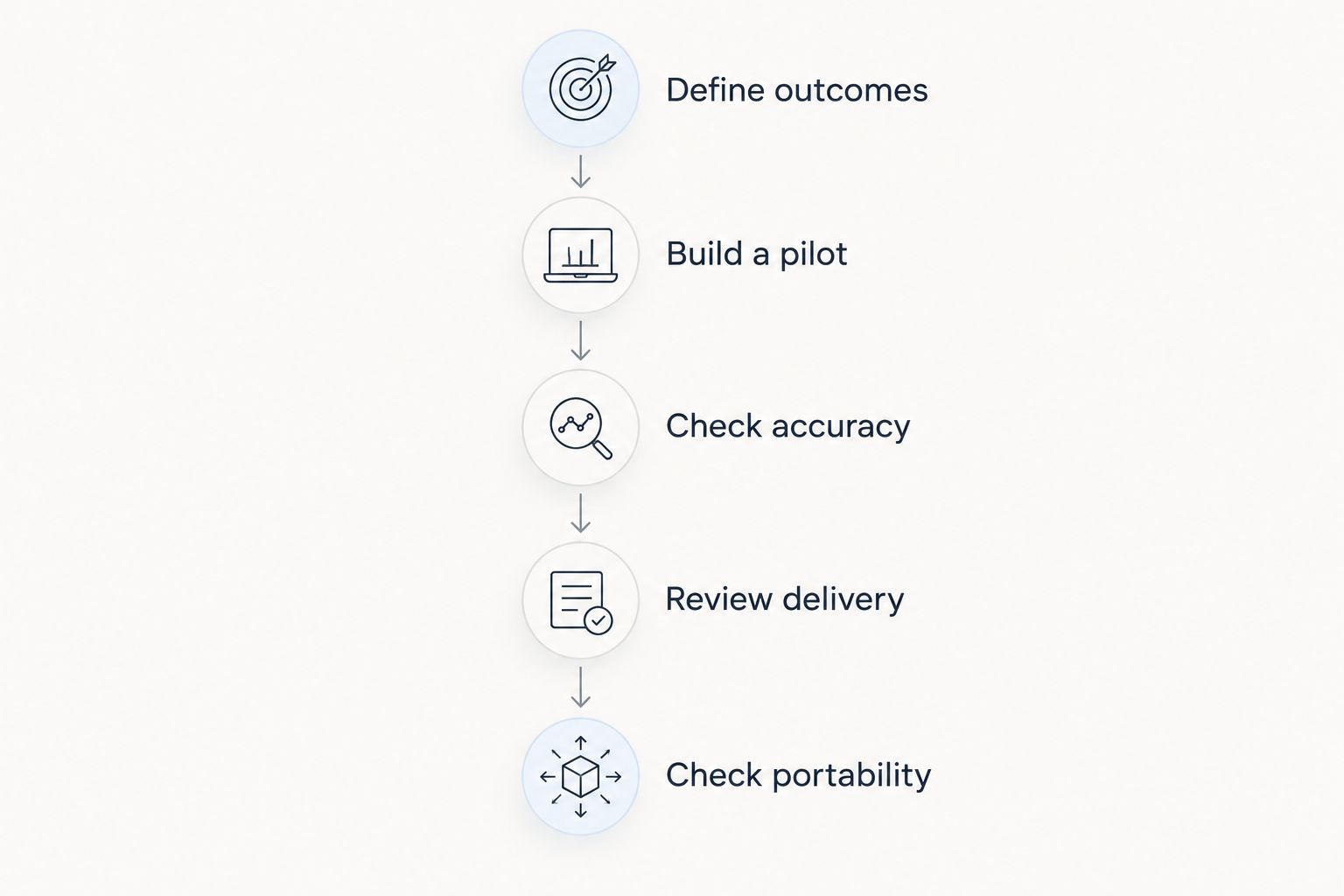
Keep the source material and learning objective identical across your trials. Otherwise, you are comparing different assignments rather than different platforms.
How we ranked
This shortlist ranks platforms by the fit between their published capabilities and a specific creator task: broader business building, course operations, marketing, interactive instruction, or document conversion. It is not a hands-on speed benchmark or a measured learning-outcomes study.
The criteria above determine the use-case labels. Confirm current feature details before choosing, particularly when an integration, assessment format, or administrative requirement is essential to your business.
Which AI course creation platform should you choose?
Choose the platform that solves your hardest repeated task. For an undecided course-first buyer, start by evaluating Thinkific; for a broader creator business, start with Useautoforgeai.
Choose Kajabi when marketing coordination is central, LearnWorlds when interactive teaching is required, or Coursebox when your starting asset is a collection of documents. Do not choose a larger feature list when a narrower workflow fits your work better.
Your final 2026 decision should follow the pilot, not precede it. A useful draft matters less than a course you can confidently publish and maintain.
FAQ
What's the best AI course creation platform in 2026?
The best platform depends on your main task: Thinkific for a course-first business, Kajabi for marketing-led launches, LearnWorlds for interactive learning, or Coursebox for document conversion. Useautoforgeai fits creators seeking course tools within a broader business-building suite.
Can AI create an entire online course for me?
AI can help draft outlines, lessons, and assessments, but generated material still needs subject-matter review. Check factual accuracy, teaching sequence, examples, and assessment answers before publishing.
Is Kajabi better than Thinkific for creating courses?
Kajabi is the stronger fit when coordinating course delivery with marketing is your main requirement; Thinkific is the course-first shortlist option. Evaluate the same lesson and launch workflow in both rather than comparing feature counts.
Which platform should I consider for interactive lessons?
LearnWorlds belongs on your shortlist for interactive lessons because it offers interactive video and AI-assisted authoring. Test whether the activities support a clear learning objective rather than adding interaction without a purpose.
Can I turn existing documents into an AI-generated course?
Coursebox supports AI-assisted course creation from source material. Review the documents first, then check that the resulting lessons preserve important conditions, explanations, and assessment answers.
What should I test before choosing an AI course platform?
Test a small course from outline through student preview, then check content portability. Use identical source material across finalists so your comparison reflects the platforms rather than different assignments.
One last thing
Test the feedback for a wrong answer. Correct-answer feedback is easy to overlook; an explanation of why a tempting answer fails reveals whether your lesson teaches the underlying idea.
Before publishing, deliberately choose an incorrect response and inspect what the student sees next. Revise feedback that merely repeats the answer without explaining the reasoning.