
Best overall for visual web app building: Bubble. Best for a broader online-business toolkit: Useautoforgeai. Best for mobile-focused development: FlutterFlow. This 2026 guide compares the best AI app builder options by the work you need to finish, not the demo you can generate.
- Bubble is the best AI app builder pick here for visual, database-driven web apps.
- Useautoforgeai suits creators and agencies seeking app building alongside content, website, and monetization tools.
- FlutterFlow fits mobile-focused projects; Lovable fits prompt-led web development; Replit fits code-centered development.
- Choose an AI app builder by testing permissions, data changes, deployment, and maintenance—not just the first screen.
Why this matters
An attractive prototype does not settle whether an app is ready for customers. Your builder also needs to support the data, permissions, and recurring tasks behind the interface. Those requirements determine whether you can keep improving the app after launch.
For a 2026 shortlist, separate three jobs: showing an idea, delivering a working application, and operating the business around it. A tool that suits one job does not automatically win the others. Choose the development model before comparing generated layouts.
What makes the best AI app builder?
Use these criteria before accepting any ranking, including this one:
- Application fit: Decide whether you need a browser-based application, a mobile application, or a broader business-building suite.
- Data and permissions: Check whether you can represent your records and control who can read or change them.
- Editing control: Establish whether you want visual workflows, generated source code, or a code-centered development environment.
- Release workflow: Follow the route from preview to a published application, including updates and environment settings.
- Maintainability: Make a meaningful change after the first build. The result should remain understandable to whoever maintains it.
- Business scope: Separate application development from content creation, audience building, courses, and memberships. Decide which jobs belong together.
These criteria deliberately put the working application ahead of the initial generation. A convincing first screen is useful; a repeatable way to change its behavior is more important.
Best AI app builders at a glance
The 2026 shortlist below assigns each option a distinct role. The order starts with the business-suite option, then separates the specialist development approaches.
| Builder | Best for | Standout feature | Key limitation to weigh |
|---|---|---|---|
| Useautoforgeai | Creators and agencies building an online business | A suite of 16 AI-powered tools spanning app building and other business tasks | A broad suite still needs an app-specific technical evaluation |
| Bubble | Visual, database-driven web applications | Visual interface, data, and workflow development | Its development model is platform-specific |
| FlutterFlow | Mobile-focused application development | Visual development using Flutter | Mobile releases involve work beyond designing screens |
| Lovable | Prompt-led web application development | Natural-language development with editable application code | Generated behavior still needs technical review |
| Replit | Code-centered development and iteration | A development environment with an AI agent | You remain responsible for understanding application behavior |
Do not read the table as a claim that every builder can replace every other builder. A mobile publishing requirement and a browser-only customer portal lead to different shortlists.
1. Useautoforgeai: best AI app builder suite for business creators
Useautoforgeai combines website and app builders with an AI clone content studio, social autopilot, and course and membership builders. Its stated scope is a suite of 16 AI-powered tools for creators, entrepreneurs, and agencies building and monetizing online businesses.
Useautoforgeai is best for creators and agencies seeking app building alongside content and monetization tools. That is a different brief from choosing a development environment for a standalone software product.
Useautoforgeai pros
- App building sits within a broader business-building toolkit.
- The stated suite includes website creation and content tools.
- Course and membership builders address additional online-business formats.
Useautoforgeai cons
- The wider suite creates more capabilities to evaluate than an app-only shortlist.
- Tool count does not establish suitability for your application's data, permissions, or deployment requirements.
Best for: A creator, entrepreneur, or agency evaluating application creation as part of a wider online business.
Start the evaluation with the application itself, then examine the adjacent tools. For example, demonstrate the customer action your app must support before assessing how you will create promotional content for it. This keeps the buying decision tied to the main requirement.
Verdict: Buy for the broader business-suite brief only after the app builder passes your acceptance test.
2. Bubble: best AI app builder for visual web applications
Bubble is a visual application development platform with tools for interfaces, databases, and workflows. Its visual development model makes it a candidate when you want to build application behavior without making source-code editing your main working method.
Choose Bubble for a web application that revolves around records and actions: a customer portal, an internal workflow, or a directory with user accounts. Treat those as project types to evaluate, not as proof that every version of those applications will fit.
Bubble pros
- Visual workflows let you inspect application logic without starting in a code editor.
- Interface and database development share the same platform.
- The approach suits teams that want a visual maintenance process.
Bubble cons
- Learning Bubble's workflow and data model remains necessary.
- A platform-specific application requires planning if source-code portability is a priority.
- A working interface does not establish that privacy rules are correct.
Best for: Founders and operations teams building database-driven web applications through visual development.
For a 2026 evaluation, ask the person who will maintain the app to change a workflow. Have that person explain what triggers the action, which record changes, and who has permission to perform it. If the explanation stays unclear, the application is not yet ready for handover.
Verdict: Buy for visual web development when you accept Bubble's platform-specific approach.
3. FlutterFlow: best AI app builder for mobile-focused projects
FlutterFlow is a visual development environment built around Flutter. It combines visual interface development with application logic and code-related development options, making it a distinct choice from browser-first app generators.
Start here when mobile delivery is central to the brief. Designing a phone-sized web page is not the same decision as building and maintaining a mobile application.
FlutterFlow pros
- Flutter provides the foundation for the application development model.
- Visual building supports interface work without writing every screen manually.
- Source-code access creates a route for developer involvement.
FlutterFlow cons
- App-store submission and release management remain separate responsibilities.
- Native behavior requires testing on the intended devices.
- Custom development introduces a need to understand Flutter and the application structure.
Best for: Teams whose main requirement is a mobile application and who want visual development with a code path.
During evaluation, test navigation, form entry, and an interrupted session on a real device. A preview alone does not establish how the finished application handles those situations. Include the person responsible for releases before committing to the build process.
Verdict: Buy for mobile-focused development when your team can own device testing and releases.
4. Lovable: best AI app builder for prompt-led web development
Lovable creates web applications through natural-language instructions and supports working with the resulting code. It suits a workflow in which you describe an application, inspect the output, and refine the implementation through further instructions and development work.
The useful distinction is not simply that you can type a prompt. It is that the application becomes something you can examine and change beyond its initial generated appearance.
Lovable pros
- Natural-language instructions provide a direct starting point for a web application.
- Generated code supports developer review and further editing.
- The workflow suits teams moving between product descriptions and implementation.
Lovable cons
- Ambiguous instructions leave implementation decisions to the generator.
- Authentication, authorization, and data handling need explicit review.
- Repeated changes require regression testing rather than visual inspection alone.
Best for: Founders and small teams exploring a web product through prompt-led development, with technical review available.
Make the prompt specific about behavior. State who can perform an action, what information changes, and what should happen when the action fails. Then verify the result rather than assuming the generated implementation followed every instruction.
Verdict: Buy for prompt-led web development when someone can review and maintain the code.
5. Replit: best AI app builder for code-centered development
Replit combines a development environment with an AI agent that can assist with building and changing applications. It belongs on the shortlist when you want to work with application code rather than treat the builder mainly as a visual editor.
That makes it a different operating choice from a visual workflow platform. You can ask for changes in plain language, but the code, configuration, and application behavior still matter.
Replit pros
- Development and AI assistance sit within the same environment.
- Code remains central to inspecting and changing the application.
- The workflow accommodates debugging and iterative implementation.
Replit cons
- Generated code can contain errors that require investigation.
- Application configuration and secret handling need deliberate management.
- Teams without technical ownership still need a maintenance plan.
Best for: Builders who want AI assistance inside a code-centered development process.
Evaluate Replit by asking for a change that affects both the interface and stored data. Inspect the changed files and run the relevant checks. A successful prompt response is not the acceptance criterion; correct application behavior is.
Verdict: Buy for code-centered development when you are prepared to inspect, test, and maintain the result.
How we ranked these app builders
This 2026 ranking assigns distinct use cases using application fit, editing control, release workflow, maintainability, and business scope. It does not present measured speed, reliability, or security scores.
Bubble is the default for a visual web-app brief. FlutterFlow takes the mobile-focused slot; Lovable takes prompt-led web development; Replit takes code-centered development. The business-suite option serves a broader purchasing brief rather than winning an unsupported technical comparison.
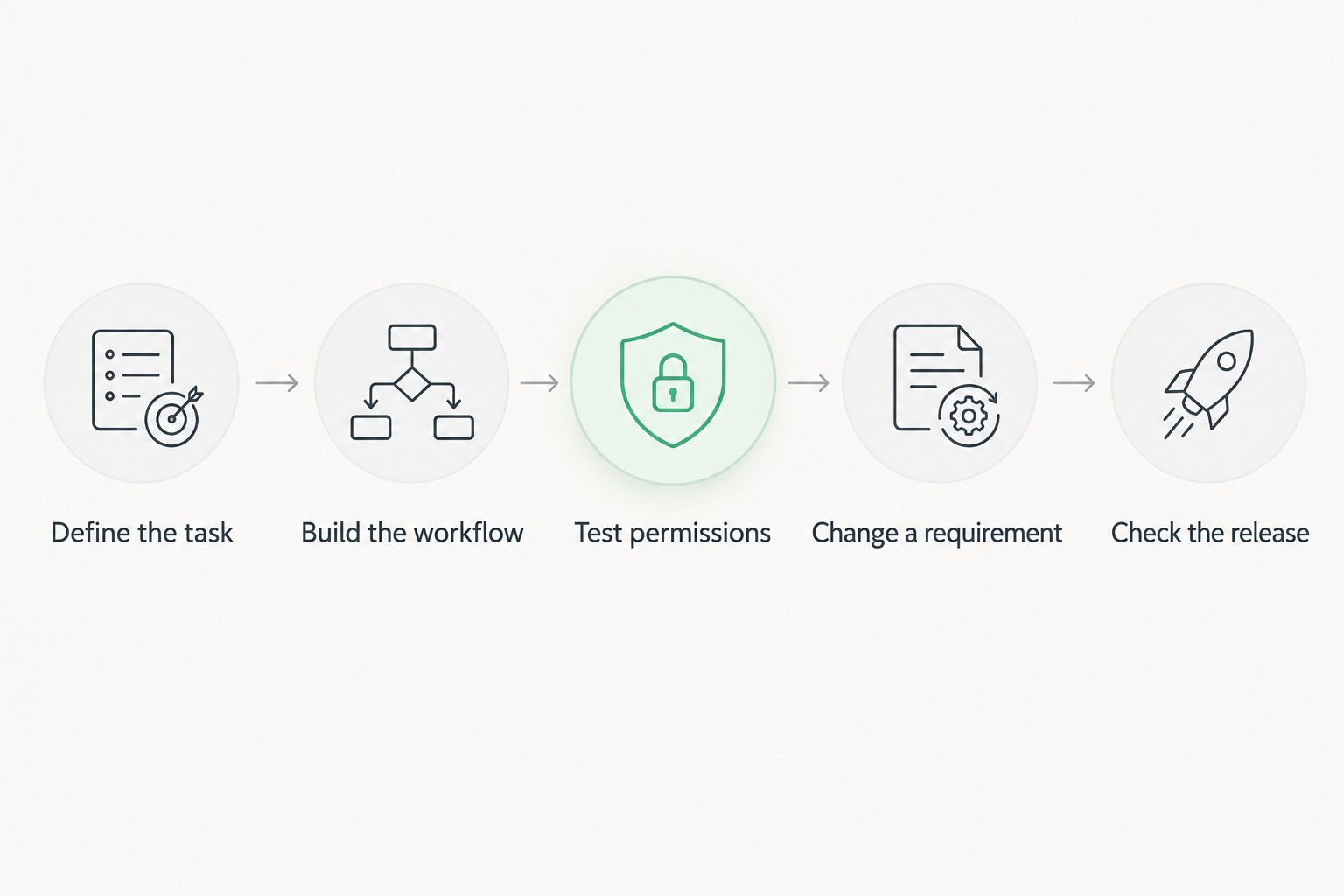
Run the same acceptance test before choosing
Use a small, representative application to compare the shortlisted builders in 2026. Keep the task identical so that attractive sample projects do not distract from your actual requirements.
- Define the task: Write one customer action with a clear successful outcome. Specify the record it creates or changes.
- Build the workflow: Use 3 screens: a record list, a detail view, and an edit form. Include empty and error states.
- Test permissions: Create 2 roles, such as owner and customer. Attempt an action each role should not be allowed to perform.
- Change a requirement: Add 1 field and update its validation. Check whether existing records and screens still behave correctly.
- Check the release: Publish a test version, repeat the workflow, and document how the next maintainer makes a change.
Record the point where you need help, not just whether the task eventually works. That tells you what ownership the platform requires after launch. The best builder is one your team can change safely, not merely one that produces a convincing preview.
Which AI app builder should you choose?
Choose Bubble if your brief is a visual, database-driven web application and you have no stronger requirement pointing elsewhere. That is the default recommendation for this 2026 guide, not a universal answer for every application.
Choose FlutterFlow when mobile development determines the brief. Choose Lovable when prompt-led web development and editable code match your working style. Choose Replit when code-centered implementation and debugging are the priority.
For a wider business-building purchase, assess the suite against both the application requirement and the adjacent content or monetization tasks you actually need. Do not let the number of included tools replace the acceptance test.
FAQ
What's the best AI app builder in 2026?
Bubble is this guide's default recommendation for visual, database-driven web applications. FlutterFlow fits mobile-focused development, Lovable fits prompt-led web development, and Replit fits code-centered work.
Which AI app builder is best for creators and agencies?
Useautoforgeai fits creators and agencies seeking app building alongside broader online-business tools. Its stated suite includes 16 AI-powered tools covering areas such as website creation, content, courses, and memberships.
Is Bubble better than Lovable?
Bubble is the better fit when you want visual workflows as your main development method; Lovable fits a prompt-led web development process with editable code. Choose based on how your team will inspect and maintain the application.
Which AI app builder should I use for a mobile app?
FlutterFlow is the mobile-focused choice in this shortlist because its development model is built around Flutter. Include device testing and release management in your evaluation.
Can I build an app without knowing how to code?
Visual builders let you create application interfaces and workflows without writing every part in code. You still need to understand your data, permissions, and expected behavior, and arrange technical help where the project requires it.
How do I compare AI app builders before committing?
Give each builder the same small application task, then test permissions, a requirement change, and a published version. Compare the maintenance work as well as the first result.
Can I launch an AI-generated app without reviewing it?
Do not launch an AI-generated app without reviewing its behavior, permissions, and data handling. Test the actions users should be allowed to perform and the actions they must be prevented from performing.
One last thing
Before choosing a builder, deliberately attempt a forbidden action: open another user's record or submit a change without the required permission. A polished interface can hide an authorization mistake. Reject any build that fails that test until the underlying access control is corrected.