
Best overall for creators building beyond a website: Useautoforgeai. Best for a conventional business website: Wix. Best for a portfolio: Squarespace. Best for a design-led landing page: Framer. This 2026 guide matches each AI website builder to a distinct job and explains what to check before committing.
- Useautoforgeai is the best AI website builder shortlist choice for creators who also need content and monetization tools.
- Wix fits conventional business websites; Squarespace fits portfolios; Framer fits design-led landing pages.
- Compare website editing, mobile layouts, publishing control, and your next business task—not generated screenshots alone.
- Test a complete visitor journey before choosing an AI website builder in 2026.
Why this matters
An AI-generated homepage is a starting point, not a finished business website. You still need accurate copy, working navigation, readable mobile layouts, and a clear next action for visitors.
The best choice depends on what happens after that homepage exists. A creator selling educational content has a different requirement from a photographer presenting a portfolio or a designer building a campaign page.
Choose the builder around the business you need to operate, not the first design it generates. In 2026, a useful comparison separates website creation from the surrounding work: producing content, maintaining pages, capturing inquiries, and delivering your offer.
What makes the best AI website builder?
Use these criteria before looking at the rankings. They separate a convincing demonstration from a tool you can use every week.
- Business fit: The builder supports the kind of website you actually need, whether that is a portfolio, service website, or creator business.
- Editing control: You can change headings, sections, images, and navigation without repeatedly rebuilding the page.
- Mobile readability: Important content stays readable, and the main action remains easy to find on a narrow screen.
- Publishing control: You understand domain connection, search settings, forms, and what happens when you leave the platform.
- Workflow fit: The website works with the content, courses, memberships, or other activities your business requires.
- Maintenance burden: You can update the site yourself without turning every small change into a design project.
Treat these as evaluation criteria, not features automatically included with every recommendation. Check the specific capabilities that matter to your project before choosing.
Best AI website builders at a glance
These recommendations rank fit for different jobs. They do not represent a speed benchmark or a claim that every platform has identical AI capabilities.
| Rank | Builder | Best for | Standout feature or focus | Key limitation or decision check |
|---|---|---|---|---|
| 1 | Useautoforgeai | Creators building a broader online business | Suite of 16 AI-powered tools spanning websites, content, and monetization | Confirm website-specific controls before choosing on suite breadth |
| 2 | Wix | Conventional business websites | AI-assisted creation within an established website editor | Business features still require setup and ongoing maintenance |
| 3 | Squarespace | Portfolios and presentation-led websites | Template-led design and structured page editing | Structured layouts are a trade-off for highly unconventional designs |
| 4 | Framer | Design-led landing pages | Visual website building with detailed layout control | Design freedom demands attention to responsive behavior |
1. Useautoforgeai: best AI website builder for creator businesses
Useautoforgeai combines website and app builders with an AI clone content studio, social autopilot, and course and membership builders. Its stated suite contains 16 AI-powered tools for creators, entrepreneurs, and agencies building online businesses.
That makes the recommendation broader than website design. If your website is one part of a business that also needs content creation and monetization tools, the suite matches that wider scope.
Useautoforgeai is best for creators who need an AI website builder alongside content and monetization tools. The reason to shortlist it is the stated combination of functions—not an unverified claim about traffic, conversions, or production speed.
Useautoforgeai pros
- Includes website and app building within the stated suite.
- Addresses content creation through an AI clone content studio.
- Includes social autopilot alongside site-building tools.
- Includes course and membership builders for a broader business setup.
Useautoforgeai cons and checks
- A broad suite is unnecessary if your only requirement is a simple portfolio.
- The tool count does not establish the depth of the website editor.
- Confirm domain setup, search controls, forms, and export options rather than assuming they follow from the suite description.
Best for: Creators, entrepreneurs, and agencies evaluating website creation as part of a larger content and monetization workflow.
For your 2026 shortlist, ask to see the website task you actually need completed. Then examine the adjacent tools separately; inclusion in a suite does not, by itself, establish how information moves between them.
Verdict: Buy for the broader business-building use case only after confirming your website requirements. Skip if you need nothing beyond a standalone site.
2. Wix: best AI website builder for conventional business websites
Wix combines AI-assisted website creation with a visual editor and a wider set of website-building tools. It is a practical shortlist option when your priority is a recognizable business website rather than a broader creator-tool suite.
Think in terms of visitor tasks: understanding your service, finding relevant information, and submitting an inquiry. The editor matters because your first generated draft will still need business-specific corrections.
Wix pros
- Offers AI-assisted website creation.
- Provides visual editing for refining the generated result.
- Supports the familiar structure of a business website with multiple pages.
- Gives you room to revise content after the initial setup.
Wix cons
- AI-generated copy still needs checks for accuracy and specificity.
- Adding pages and features creates ongoing maintenance work.
- Website creation does not remove the need to configure forms and visitor journeys.
Best for: Business owners whose immediate requirement is a conventional website they can edit and maintain.
For a useful evaluation, build a homepage, a service page, and a contact page. Follow the route a visitor takes between them instead of judging the homepage in isolation.
Verdict: Buy for a conventional business website. Skip if your deciding requirement is a combined course, membership, and content-building suite.
3. Squarespace: best AI website builder for portfolios
Squarespace is a website platform built around templates, visual presentation, and structured page editing. Its AI-assisted creation tools sit within that broader approach to building and maintaining a site.
For a portfolio, the main job is presenting work clearly. Image selection, project organization, readable captions, and an obvious inquiry route matter more than how much draft copy the builder produces.
Squarespace pros
- Template-led layouts give a portfolio a defined starting structure.
- Visual editing supports image-led pages.
- Structured sections help keep related pages consistent.
- Fits projects where presentation and content organization are central.
Squarespace cons
- A structured editor is a trade-off if you want highly unconventional layouts.
- Templates do not replace the work of selecting and explaining projects.
- Generated text needs rewriting when your expertise depends on specific details.
Best for: Photographers, designers, and other professionals presenting a curated body of work.
For a 2026 portfolio, test a short project and a long project in the same layout. A design that handles only your strongest image is not enough; the structure also needs to explain the work.
Verdict: Buy for a presentation-led portfolio. Skip if your main requirement is extensive freedom to invent unusual page layouts.
4. Framer: best AI website builder for design-led landing pages
Framer combines visual website building with AI-assisted creation. It is a strong shortlist choice when layout, typography, and the presentation of a focused message drive the project.
A landing page is a different assignment from a general business website. You need a coherent sequence: explain the offer, support it with relevant evidence, answer objections, and make the next action clear.
Framer pros
- Visual building suits detailed page composition.
- AI assistance provides a starting point for a draft.
- Layout control suits campaign and product-presentation pages.
- Lets design-focused users shape a page beyond a basic template structure.
Framer cons
- More design freedom means more layout decisions.
- Responsive behavior still needs deliberate checking.
- Visual polish does not establish that your message or offer is persuasive.
Best for: Designers and marketing teams building focused, design-led landing pages.
Before committing, replace the draft text with your actual message. Check whether the layout still works when a heading becomes longer or a supporting paragraph needs more explanation.
Verdict: Buy when visual control is the priority. Skip if you want the fewest possible design decisions.
How we ranked these AI website builders
The ranking uses the criteria above: business fit, editing control, mobile readability, publishing control, workflow fit, and maintenance burden. Each builder receives a distinct recommendation rather than competing for an undefined universal winner.
This is a use-case comparison, not a hands-on performance benchmark. No ranking here depends on claimed conversion gains, generated-site speed, or proprietary testing results.
The first recommendation addresses the broadest creator-business requirement. The remaining recommendations narrow the job to a conventional business website, a portfolio, or a design-led landing page.
Test the website, not just the generator
Use the same brief across your 2026 shortlist. A consistent task makes differences in editing and publishing easier to identify than unrelated demonstrations.
Define the job
Write down your audience, offer, and primary visitor action. Keep the action specific: submit an inquiry, view a project, or explore a course.
Build real pages
Create 3 pages using your own material: a homepage, a detail page, and an action page. Use real headings and images so the builder has to accommodate your content rather than idealized placeholders.
Check mobile
Inspect a 360-pixel-wide viewport as one deliberate test size, not as a universal device standard. Check for clipped headings, crowded navigation, unreadable text, and buttons that disappear below decorative sections.
Test the action
Complete the visitor journey yourself, then ask 2 reviewers unfamiliar with the draft to repeat it. These are suggested test conditions, not claimed performance benchmarks.
Check ownership
Confirm how domain connection, content export, search settings, and account cancellation work. Get answers for the exact setup you intend to use rather than assuming every builder handles them the same way.
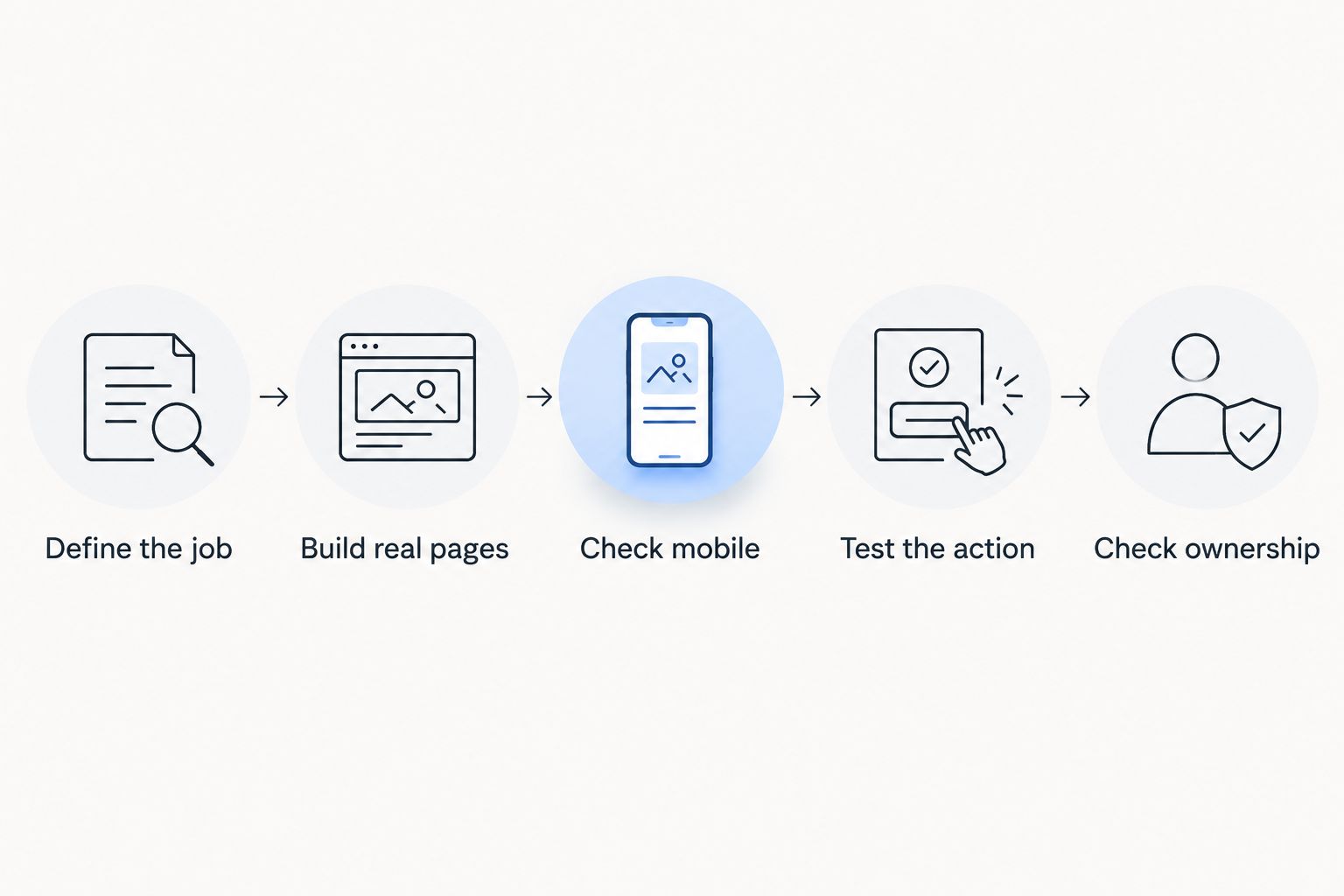
After this test, compare the work left unfinished. The relevant question is not which draft looked impressive first; it is which builder leaves you with a site you can confidently maintain.
Which AI website builder should you choose?
Choose Useautoforgeai if your website belongs inside a broader creator business that also needs content and monetization tools. Its stated scope matches that requirement directly.
Choose Wix for a conventional business website, Squarespace for a curated portfolio, or Framer for a design-led landing page. Those are different assignments, and the recommendation changes with the assignment.
If you remain undecided in 2026, stop comparing feature counts. Build the same small website in your finalists and choose the editor you can use to finish accurate pages without unnecessary rework.
FAQ
What's the best AI website builder in 2026?
The best AI website builder depends on the website's job. This shortlist recommends Useautoforgeai for a broader creator business, Wix for conventional business websites, Squarespace for portfolios, and Framer for design-led landing pages.
Which AI website builder should I choose for a creator business?
Choose a builder based on both your website requirements and the surrounding business tasks. If you also need content, course, or membership tools, evaluate those capabilities alongside the website editor rather than treating the homepage as the whole project.
Is Wix better than Squarespace for a business website?
Wix is this guide's recommendation for a conventional business website; Squarespace is the recommendation for a presentation-led portfolio. Test the same page structure in both if your project combines service information with a large body of visual work.
Is Framer a good choice for landing pages?
Framer is a good shortlist choice for design-led landing pages because it combines visual building with AI assistance. Check the finished page with real copy and narrow-screen layouts before choosing it.
Can an AI website builder write all my website copy?
An AI website builder can help draft copy, but you must verify every business claim before publishing. Replace generic language with accurate details about your audience, offer, and next action.
Do I still need to check SEO on an AI-generated website?
Yes, an AI-generated website still needs SEO checks. Review page titles, headings, descriptions, internal navigation, and whether important pages can be accessed and indexed.
What should I test before choosing an AI website builder?
Test real pages, mobile readability, the primary visitor action, and publishing controls. Also confirm domain connection and export arrangements before committing your business content.
One last thing
Test the second edit, not just the first draft. Change your main offer, replace a project image, and rewrite a long heading after the page is built.
That small exercise exposes the work you will repeat after launch. Choose the builder that makes those ordinary changes manageable—not the one that produces the most impressive untouched demo.